<div id="container-eletrico" style="position: relative; width: 100%; max-width: 800px; cursor: crosshair; overflow: hidden;">
    <img src="https://ccet2.uniriotec.br/wp-content/uploads/sites/63/2026/03/221-1.png" style="width: 100%; display: block;">
    <canvas id="canvas-raios" style="position: absolute; top: 0; left: 0; pointer-events: none;"></canvas>
</div>

<script>
const canvas = document.getElementById('canvas-raios');
const ctx = canvas.getContext('2d');
const container = document.getElementById('container-eletrico');

function resize() {
    canvas.width = container.offsetWidth;
    canvas.height = container.offsetHeight;
}
window.addEventListener('resize', resize);
resize();

let mouse = { x: null, y: null };
container.addEventListener('mousemove', (e) => {
    const rect = container.getBoundingClientRect();
    mouse.x = e.clientX - rect.left;
    mouse.y = e.clientY - rect.top;
    drawLightning();
});

function drawLightning() {
    ctx.clearRect(0, 0, canvas.width, canvas.height);
    if (!mouse.x) return;

    ctx.strokeStyle = '#00f2ff'; // Cor do raio (azul ciano)
    ctx.lineWidth = 2;
    ctx.shadowBlur = 10;
    ctx.shadowColor = '#00f2ff';

    ctx.beginPath();
    let curX = mouse.x;
    let curY = mouse.y;
    ctx.moveTo(curX, curY);

    // Cria 3 "pernas" de raios aleatórios ao redor do mouse
    for (let j = 0; j < 3; j++) {
        curX = mouse.x;
        curY = mouse.y;
        for (let i = 0; i < 5; i++) {
            curX += (Math.random() - 0.5) * 40;
            curY += (Math.random() - 0.5) * 40;
            ctx.lineTo(curX, curY);
        }
        ctx.moveTo(mouse.x, mouse.y);
    }
    ctx.stroke();

    // Limpa o raio suavemente após 100ms
    setTimeout(() => {
        ctx.clearRect(0, 0, canvas.width, canvas.height);
    }, 100);
}

container.addEventListener('mouseleave', () => {
    ctx.clearRect(0, 0, canvas.width, canvas.height);
});
</script>
const canvas = document.getElementById(‘canvas-raios’);
const ctx = canvas.getContext(‘2d’);
const container = document.getElementById(‘container-eletrico’);
const img = document.getElementById(‘img-servidor’);
function resize() {
canvas.width = container.offsetWidth;
canvas.height = container.offsetHeight;
}
// Garante que o canvas tenha o tamanho da imagem após ela carregar
img.onload = resize;
window.addEventListener(‘resize’, resize);
if (img.complete) resize();
container.addEventListener(‘mousemove’, (e) => {
const rect = container.getBoundingClientRect();
const x = e.clientX – rect.left;
const y = e.clientY – rect.top;
drawLightning(x, y);
});
function drawLightning(x, y) {
ctx.clearRect(0, 0, canvas.width, canvas.height);
ctx.strokeStyle = ‘#4deeea’; // Ciano elétrico
ctx.lineWidth = 1.5;
ctx.shadowBlur = 15;
ctx.shadowColor = ‘#00f2ff’;
for (let i = 0; i < 3; i++) {
ctx.beginPath();
ctx.moveTo(x, y);
let curX = x;
let curY = y;
for (let j = 0; j ctx.clearRect(0, 0, canvas.width, canvas.height), 80);
}
container.addEventListener(‘mouseleave’, () => ctx.clearRect(0, 0, canvas.width, canvas.height));
alert(‘JS funcionando!’);
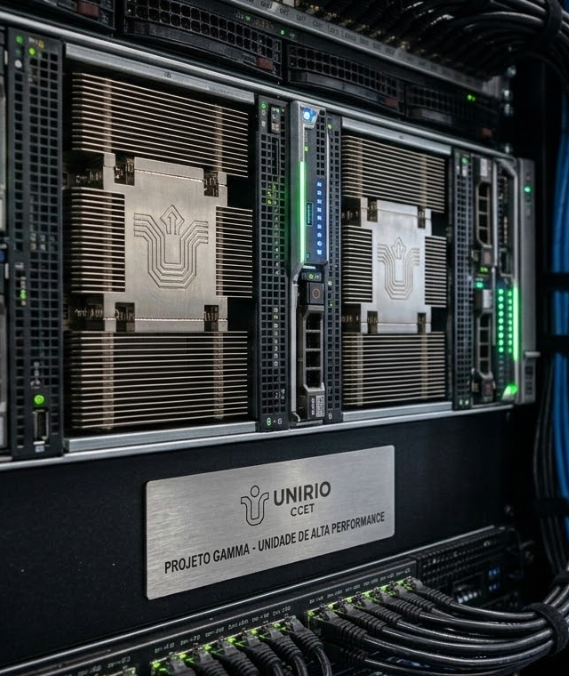
PROJETO GAMMA
Pesquisa avançada em algoritmos paralelos para processamento de dados massivos e sistemas de missão crítica.